

Ask an AI about this page
 ChatGPT
 Claude
 Perplexity
 Google AI Mode
 Microsoft Copilot
 Grok
Grok Mistral Le Chat
Enrol a customer in Direct Debit from the merchant dashboard
New Enrollment starts a Direct Debit e-Mandate for a customer from the merchant dashboard. Use it when you do not have a website or plugin that does the enrolment for you.
Enrol a customer
Section titled “Enrol a customer”You need the Portal Key of a portal that has Direct Debit turned on.
- Sign in to the merchant dashboard.
- In the top menu, choose Transactions, then choose e-Mandates.
- Choose New Enrollment. The Direct Debit Enrollment form opens.
- Fill in the fields. The table below gives each field.
- Choose Proceed With Enrollment.
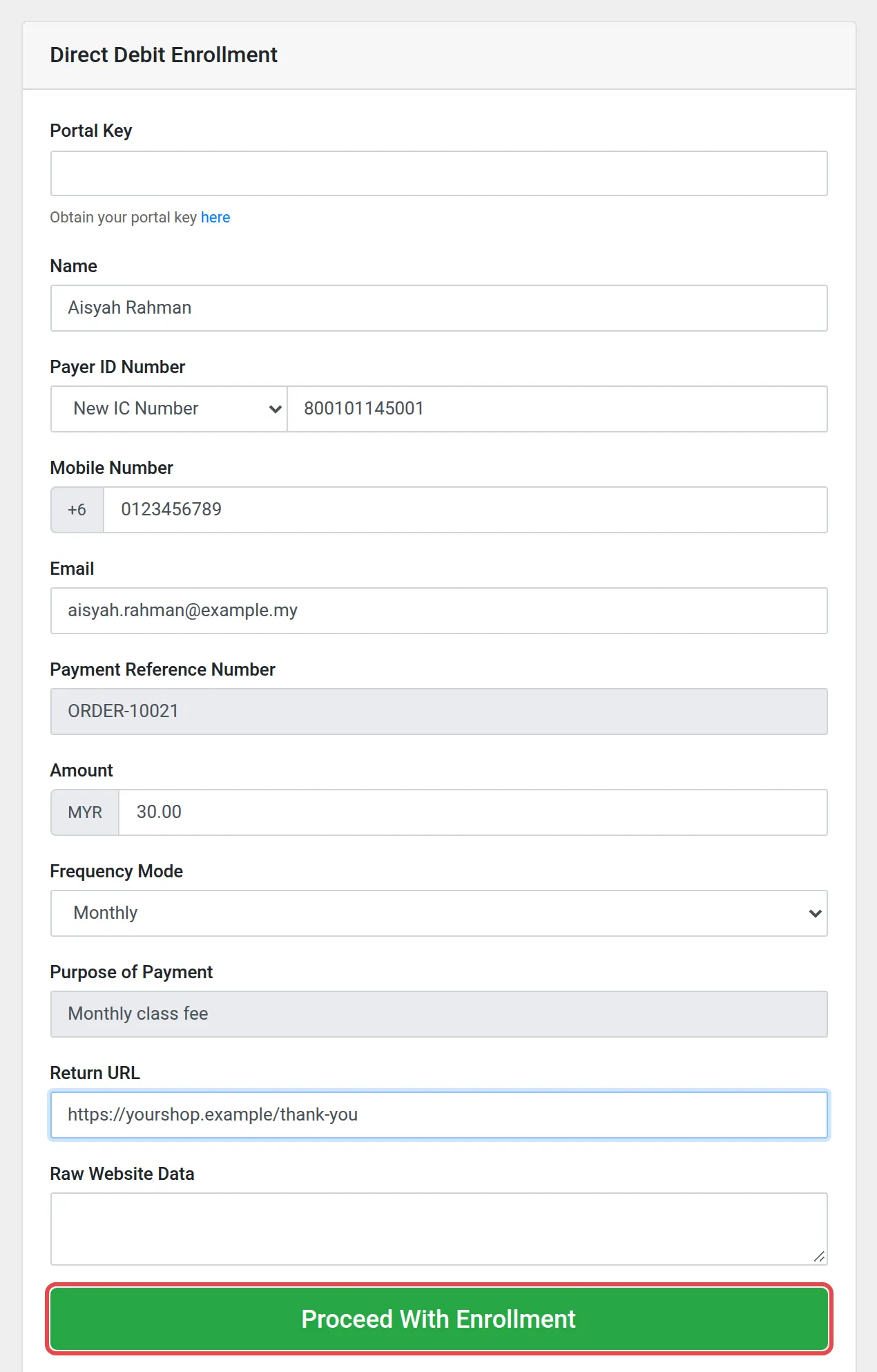
The form has these fields:
| Field | What to type |
|---|---|
| Portal Key | The key of the portal that receives the deductions. See Find your API keys |
| Name | The name of the customer |
| Payer ID Number | The type of ID (New IC Number, Old IC Number, Passport Number, Business Registration or Others) and the number |
| Mobile Number and Email | The contact details of the customer |
| Payment Reference Number | Your own reference for this e-Mandate |
| Amount | The amount of each deduction, in MYR |
| Frequency Mode | Weekly (deductions on Friday), Monthly or Yearly. Do not choose Daily: Bayarcash does not offer it |
| Purpose of Payment | What the customer pays for |
| Return URL | The page that opens after the enrolment |
| Raw Website Data | Extra data from your website, if you have it |
After the enrolment
Section titled “After the enrolment”The new e-Mandate shows in the Direct Debit e-Mandates list. Its status changes when the bank replies. See Check your Direct Debit e-Mandates.
Common issues
Which ID types can the customer use?
New IC Number, Old IC Number, Passport Number, Business Registration or Others.
How often can a deduction run?
Choose Weekly, Monthly or Yearly in Frequency Mode. The list also shows Daily, but Bayarcash does not offer daily Direct Debit.
Was this article helpful?
Thanks for your feedback.
Sorry this didn't help. WhatsApp us and we'll sort it out with you.